

Why You Should Book a Healthcare Management Software Free Demo Today

The Growing Need for Digital Healthcare Systems
Healthcare today is no longer just about doctors, nurses, and patients—it’s about technology working quietly behind the scenes to make everything smoother, faster, and safer. If you’ve ever walked into a hospital and noticed how quickly your records were pulled up or how efficiently appointments were handled, chances are you’ve already seen healthcare software in action. But here’s the catch: not all systems are created equal, and choosing the right one can feel overwhelming.
That’s exactly where a healthcare management software free demo becomes incredibly valuable. Instead of guessing what works, you get to see it live, in action, tailored to real-world scenarios. Think of it like test-driving a car—you wouldn’t buy one without sitting behind the wheel, right? The same logic applies here.
The demand for digital healthcare systems has skyrocketed in recent years. According to industry reports, over 70% of healthcare providers are investing in digital transformation, aiming to improve patient care and reduce operational costs. From electronic health records (EHR) to billing automation, everything is moving toward smarter systems.
What makes this shift even more important is patient expectation. People now expect faster service, accurate records, and seamless communication. Without the right software, meeting these expectations becomes nearly impossible. That’s why scheduling a demo isn’t just a good idea—it’s a strategic move toward staying competitive.
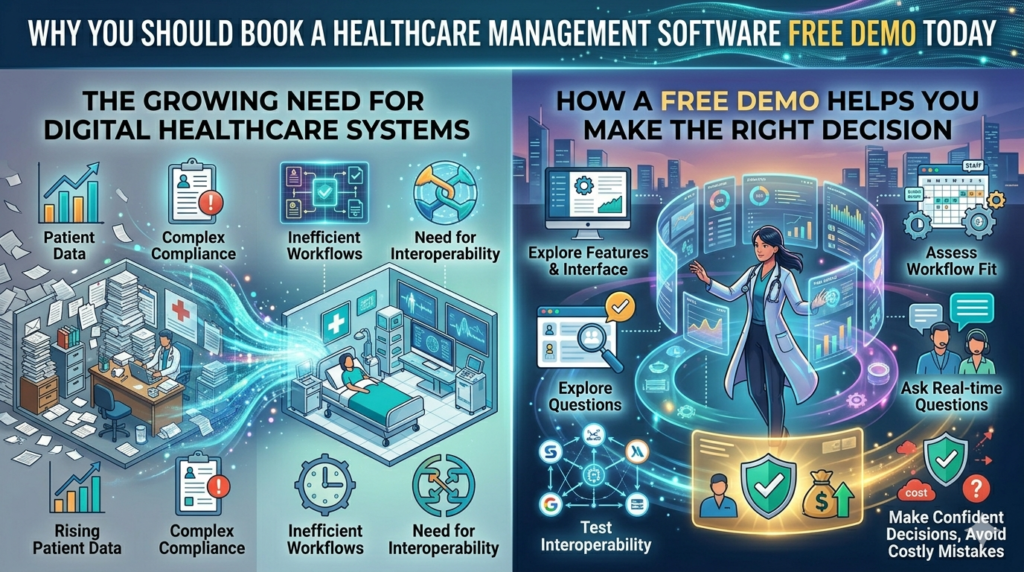
How a Free Demo Helps You Make the Right Decision
Let’s be honest—brochures and sales pages can only tell you so much. A hospital management software demo goes beyond promises and shows you exactly how the system works in real time. You get to explore features, ask questions, and understand how it fits into your workflow.
One of the biggest advantages of a demo is clarity. Instead of dealing with technical jargon, you see practical use cases. For instance, how does the system handle patient check-ins? Can it generate reports instantly? How secure is the data? These are things you can evaluate firsthand.
Another benefit is risk reduction. Investing in healthcare software is a big decision, both financially and operationally. A demo minimizes uncertainty. It allows you to compare options, involve your team, and make a well-informed choice without pressure.
You also get a feel for usability. Even the most advanced system is useless if your staff finds it complicated. During a demo, you can gauge how intuitive the interface is and whether it aligns with your team’s skill level.
In short, a free demo isn’t just a preview—it’s your opportunity to make a confident, informed decision that can transform your healthcare operations.
How to Schedule Healthcare Software Demo Easily Online
Step-by-Step Process to Book Healthcare Software Demo Online
Scheduling a healthcare software demo today is easier than ordering food online—and that’s not an exaggeration. Most providers, including H.R. Software Solutions, have streamlined the process so you can book healthcare software demo online in just a few clicks.
It usually starts with a simple form on the website. You’ll be asked for basic details like your name, organization type (hospital, clinic, or private practice), and preferred time slot. This step ensures that the demo is tailored specifically to your needs. After all, a large hospital and a small clinic don’t require the same features.
Once you submit your request, the team typically reaches out to confirm your clinic software demo appointment. Some platforms even allow instant scheduling using integrated calendars, which means you can lock in your slot immediately without back-and-forth emails.
What’s interesting is how personalized these demos have become. Instead of generic walkthroughs, you get a session focused on your workflow. For example, if you run a diagnostic center, the demo might highlight lab management features. If you manage a multi-specialty hospital, it may focus on ERP modules and integration capabilities.
Another advantage is flexibility. You can attend the demo from anywhere—your office, home, or even on the go. All you need is a stable internet connection. This convenience has made medical software demo booking more accessible than ever before.
Common Mistakes to Avoid When Booking a Demo
While booking a demo is simple, many people unknowingly make mistakes that limit its value. One common issue is not being clear about requirements. If you don’t specify your needs, the demo may end up being too generic, leaving you with more questions than answers.
Another mistake is attending the demo alone. Healthcare software impacts multiple departments—administration, billing, patient care—so it’s always better to involve key team members. This ensures that everyone’s concerns are addressed.
Timing also matters. Don’t rush into a demo without preparation. Take some time to list your current challenges and goals. Are you looking to improve patient flow? Reduce billing errors? Enhance reporting? Having clarity will help you get the most out of the session.
Lastly, don’t hesitate to ask questions. A demo is your chance to dig deep. Ask about customization, scalability, support, and pricing. The more you पूछ, the better your decision will be.
Avoiding these simple mistakes can turn a basic demo into a powerful decision-making tool.
What to Expect from a Hospital Management Software Demo
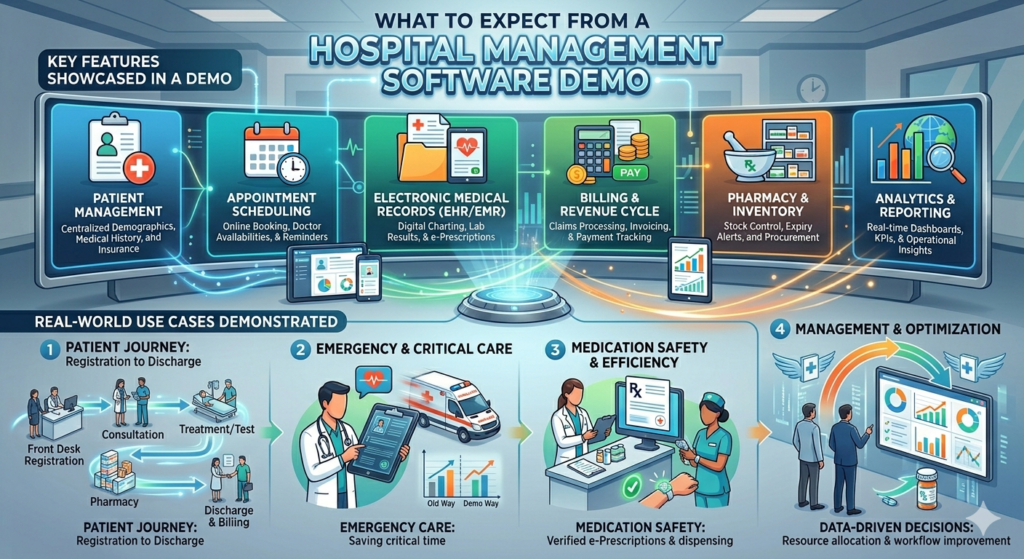
Key Features Showcased in a Demo
When you schedule a hospital management software demo, you’re not just watching a presentation—you’re stepping into a simulated environment that mirrors real hospital operations. The goal is to give you a clear understanding of how the software performs under everyday conditions.
One of the first things you’ll notice is the dashboard. This is essentially the control center, where administrators can monitor everything from patient admissions to financial reports. A good system will present this data in a clean, easy-to-understand format, often using charts and graphs for quick insights.
You’ll also see modules like patient registration, appointment scheduling, billing, and inventory management. These features are usually interconnected, meaning data flows seamlessly from one section to another. For example, once a patient is registered, their information becomes instantly available to doctors, billing staff, and pharmacists.
Security is another major focus during the demo. With sensitive patient data involved, the software must comply with strict regulations. Expect to see features like role-based access, encryption, and audit trails.
What makes an advanced healthcare software demo stand out is automation. Tasks that once required manual effort—like generating invoices or sending appointment reminders—are handled automatically, saving time and reducing errors.
Real-World Use Cases Demonstrated
A good demo doesn’t just show features—it tells a story. You’ll often see real-world scenarios, such as a patient booking an appointment, visiting the doctor, undergoing tests, and completing payment. This end-to-end demonstration helps you understand how the system works in practice.
For instance, imagine a busy morning at a hospital. Patients are arriving, appointments are being scheduled, and doctors need quick access to records. During the demo, you’ll see how the software handles this chaos effortlessly, turning it into an organized workflow.
Another common scenario is emergency handling. The system’s ability to quickly retrieve patient history and allocate resources can be a lifesaver—literally.
These demonstrations are designed to answer one key question: “Will this work for me?” By the end of the session, you should have a clear picture of how the software fits into your operations.
Benefits of a Clinic Management Software Free Trial for Small Practices
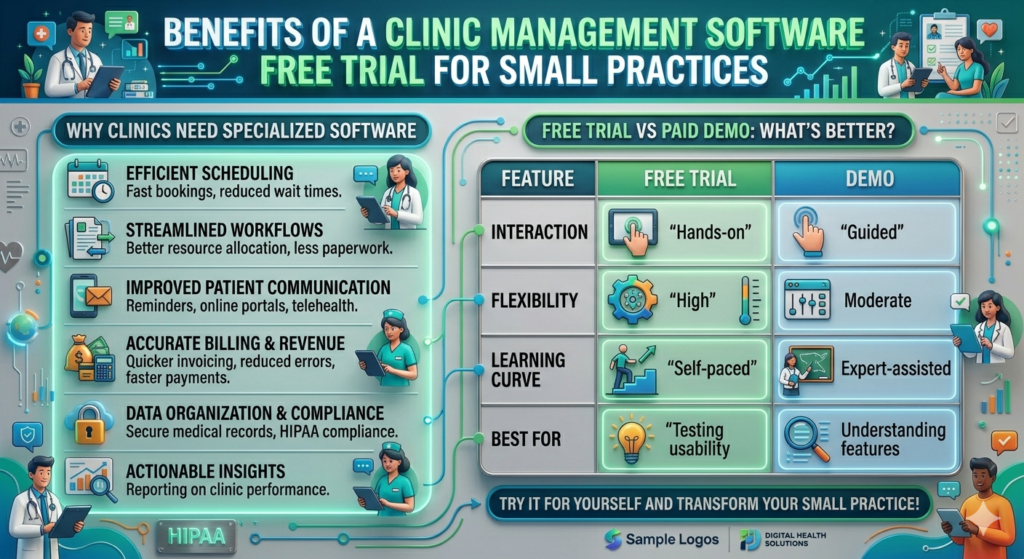
Why Clinics Need Specialized Software
Running a clinic might seem simpler than managing a full-scale hospital, but anyone in the field knows that’s far from the truth. Clinics deal with tight schedules, limited staff, and a constant need to deliver quick yet accurate patient care. This is exactly where a clinic management software free trial becomes a game-changer. It allows small practices to explore powerful tools without financial pressure, making it easier to transition from manual systems to digital efficiency.
Think about the daily chaos in a clinic—patients walking in, phones ringing, files being shuffled, and staff trying to keep everything organized. Without a centralized system, even small errors can snowball into bigger problems. Missed appointments, misplaced records, or billing mistakes can directly affect patient satisfaction and revenue. A specialized clinic software addresses these issues by streamlining operations into a single platform.
During a free trial, you can see how features like appointment scheduling, digital prescriptions, and patient records management actually work in real time. It’s not just about convenience; it’s about improving the quality of care. For instance, having instant access to a patient’s medical history can help doctors make faster and more accurate decisions.
Another important factor is scalability. Many clinics start small but aim to grow. The right software should grow with you, and a trial period helps you evaluate whether it can handle increased patient loads and additional services in the future. Instead of guessing, you’re making a decision based on experience.
Free Trial vs Paid Demo: What’s Better?
Now, you might be wondering—should you go for a free trial or a demo? The truth is, both serve different purposes, and understanding the difference can help you make a smarter choice. A medical practice management demo is usually guided, meaning a product expert walks you through the system, explaining features and answering questions. It’s structured, informative, and ideal for getting a comprehensive overview.
On the other hand, a free trial puts you in control. You get hands-on experience, allowing you to explore the system at your own pace. Want to test how quickly you can register patients? Or how easy it is to generate reports? A trial lets you do all that without any supervision.
Here’s a quick comparison to make things clearer:
| Feature | Free Trial | Demo |
| Interaction | Hands-on | Guided |
| Flexibility | High | Moderate |
| Learning Curve | Self-paced | Expert-assisted |
| Best For | Testing usability | Understanding features |
The ideal approach? Use both. Start with a demo to understand the system, then move to a trial to experience it firsthand. This combination gives you a 360-degree view, ensuring you choose software that truly meets your needs.
Medical Software Demo Booking: Everything You Need to Know
When Is the Right Time to Book a Demo?
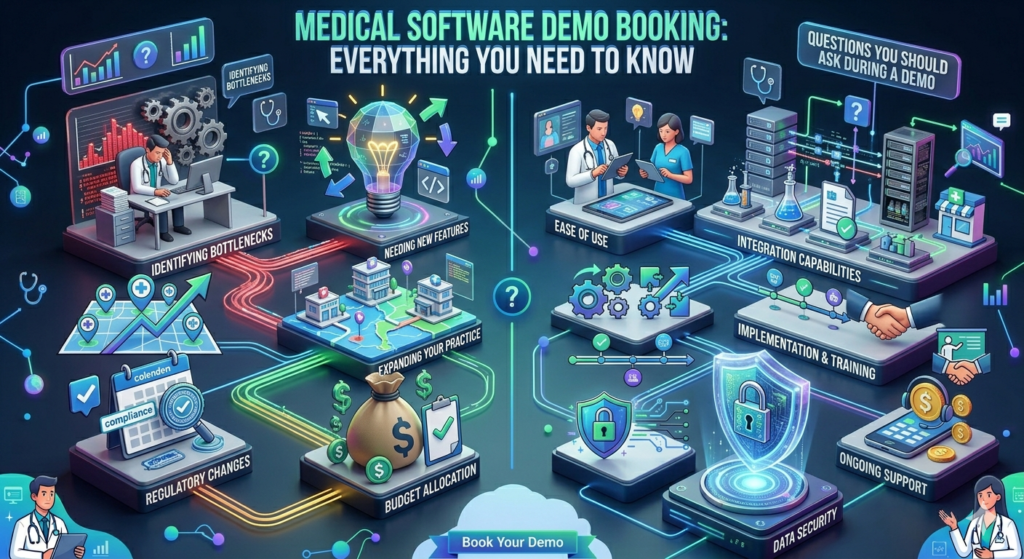
Timing can make all the difference when it comes to medical software demo booking. Many healthcare providers delay this step, thinking they’ll handle it “later,” but that often leads to missed opportunities. The best time to schedule a demo is when you start noticing inefficiencies in your current system—whether it’s slow processes, frequent errors, or difficulty managing patient data.
If your staff is spending more time on paperwork than patient care, that’s a clear sign you need an upgrade. Similarly, if patients are complaining about long wait times or billing issues, it’s time to explore better solutions. A healthcare IT software demo can show you exactly how technology can resolve these challenges.
Another good time to book a demo is during expansion. If you’re opening a new branch or adding services, having the right software in place from the beginning can save you a lot of headaches later. It ensures consistency across operations and improves overall efficiency.
Even if you’re satisfied with your current system, it’s still worth exploring new options. Technology evolves rapidly, and what worked a few years ago might now be outdated. Booking a demo keeps you informed and helps you stay ahead of the curve.
Questions You Should Ask During a Demo
A demo is not just about watching—it’s about engaging. Asking the right questions can reveal insights that aren’t immediately visible. Start with usability. Ask how easy it is for new staff to learn the system. Is training provided? How long does it typically take to get comfortable?
Next, focus on customization. Every healthcare facility is unique, so the software should adapt to your needs, not the other way around. Ask whether features can be tailored to your workflow.
Security is another critical area. With sensitive patient data involved, you need to know how the system protects information. Ask about encryption, access controls, and compliance with regulations.
Don’t forget about support. What happens if something goes wrong? Is there a dedicated support team? How quickly do they respond? These questions might seem small, but they can have a big impact on your experience.
By the end of the demo, you should feel confident, not confused. If something isn’t clear, keep asking until it is.
Healthcare ERP Demo Request: A Complete Overview
What Is Healthcare ERP Software?
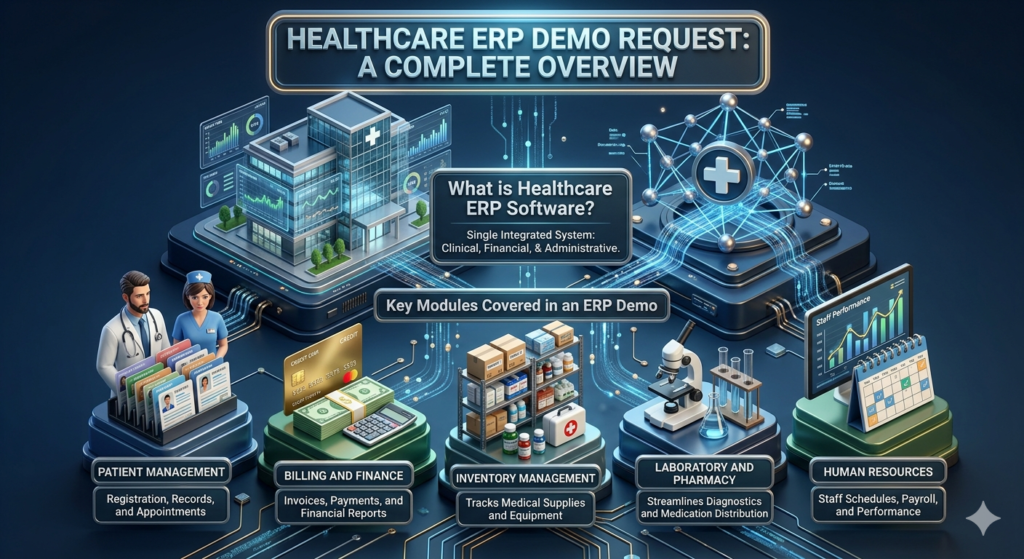
When you hear the term healthcare ERP demo request, it might sound a bit technical, but the concept is actually straightforward. ERP stands for Enterprise Resource Planning, and in healthcare, it refers to a system that integrates all operations into a single platform. From patient management to billing, inventory, and HR, everything is connected.
Imagine running a hospital where every department operates in isolation. Communication gaps, duplicated work, and inefficiencies become inevitable. An ERP system eliminates these issues by creating a unified ecosystem. Information flows seamlessly, enabling better coordination and decision-making.
A free hospital ERP demo allows you to see this integration in action. You’ll understand how different modules interact and how data moves across the system. For example, when a patient is admitted, their information is automatically available to the billing department, pharmacy, and laboratory.
This level of integration not only improves efficiency but also enhances patient care. Doctors get accurate information quickly, staff can focus on their tasks without unnecessary delays, and administrators gain better control over operations.
Key Modules Covered in an ERP Demo
During a healthcare ERP demo request, you’ll typically be introduced to several key modules that form the backbone of the system. These modules are designed to handle specific functions while working together seamlessly.
Some of the most important modules include:
- Patient Management: Handles registration, records, and appointments
- Billing and Finance: Manages invoices, payments, and financial reports
- Inventory Management: Tracks medical supplies and equipment
- Human Resources: Manages staff schedules, payroll, and performance
- Laboratory and Pharmacy: Streamlines diagnostics and medication distribution
What makes these modules powerful is their integration. For instance, when a doctor prescribes medication, the pharmacy module is automatically updated, and the billing system generates the corresponding charges.
The demo will show you how these modules work together, giving you a clear picture of the system’s capabilities. It’s like seeing the gears of a well-oiled machine in motion—everything connected, everything efficient.
Patient Management Software Demo: Streamlining Patient Care
Features That Improve Patient Experience
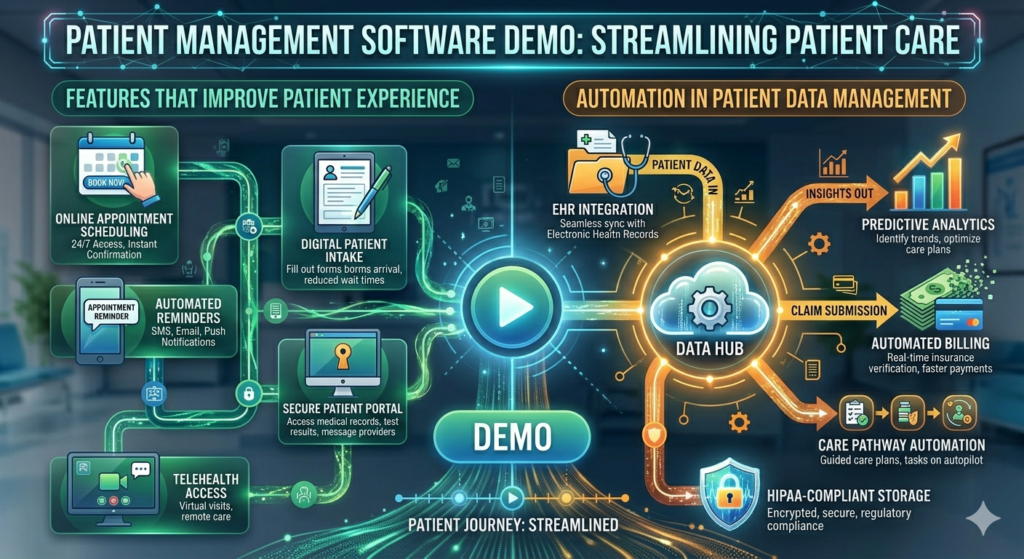
At the heart of every healthcare system is the patient, and a patient management software demo focuses on improving their experience. After all, satisfied patients are more likely to return and recommend your services to others.
One of the standout features is appointment scheduling. Patients can book, reschedule, or cancel appointments بسهولة, reducing the workload on staff. Automated reminders ensure that fewer appointments are missed, saving time and resources.
Another important feature is digital records. Instead of flipping through files, doctors can access patient information instantly. This not only speeds up consultations but also reduces the risk of errors.
Communication is also enhanced. Many systems include messaging features that allow patients to interact with healthcare providers directly. Whether it’s a follow-up question or a test result, communication becomes seamless.
These features might seem simple, but their impact is significant. They create a smoother, more efficient experience for both patients and staff.
Automation in Patient Data Management
Automation is where things get really interesting. During a patient management software demo, you’ll see how routine tasks are handled automatically, freeing up time for more important work.
For example, data entry can be minimized through smart forms and integrations. Reports can be generated instantly, providing valuable insights into patient trends and operational performance.
Automation also improves accuracy. Manual processes are prone to errors, but automated systems reduce this risk significantly. This is especially important in healthcare, where even small mistakes can have serious consequences.
In essence, automation transforms the way healthcare facilities operate. It turns complex processes into simple workflows, making everything more efficient and reliable.
Hospital Software Free Demo Today: Why Timing Matters
Staying Ahead in a Competitive Healthcare Industry
The healthcare industry is evolving rapidly, and staying competitive requires constant innovation. Scheduling a hospital software free demo today is not just about exploring new technology—it’s about positioning yourself for future success.
Hospitals that adopt advanced software gain a significant advantage. They can handle more patients, reduce costs, and deliver better care. On the other hand, those that stick to outdated systems often struggle to keep up.
Timing plays a crucial role here. The earlier you adopt new technology, the sooner you start reaping its benefits. Waiting too long can put you at a disadvantage, especially as competitors move ahead.
Immediate Benefits of Scheduling a Demo Today
Booking a demo today offers immediate benefits. You get a firsthand look at what modern healthcare software can do, helping you make informed decisions quickly.
It also allows you to identify gaps in your current system. Once you see what’s possible, it becomes easier to recognize what’s missing in your setup.
Most importantly, it sets the stage for improvement. Whether you decide to implement the software immediately or later, the demo gives you a clear direction.
Clinic Software Demo Appointment: Personalized Experience
Customization Options Explained
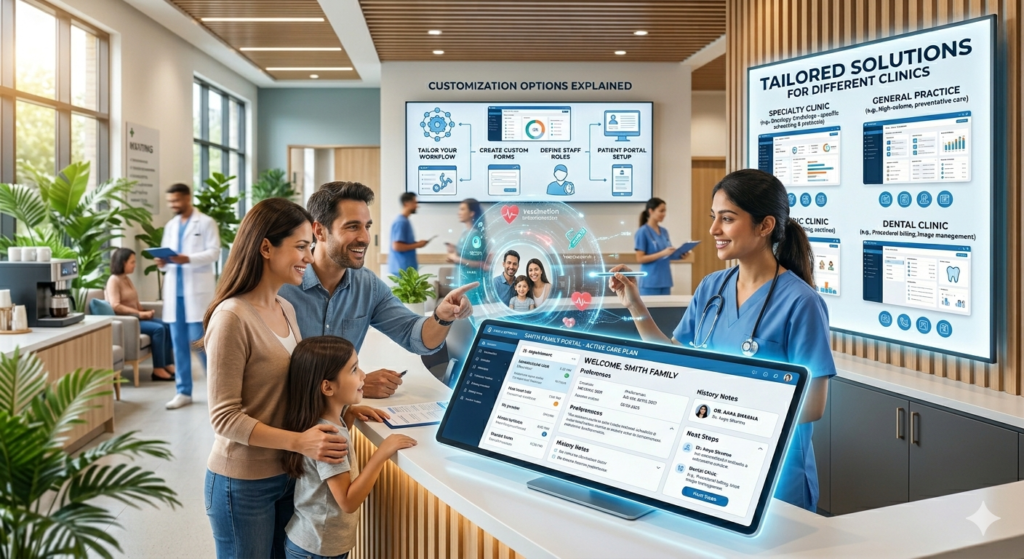
When you book a clinic software demo appointment, you’re not stepping into a one-size-fits-all presentation. Instead, you’re entering a tailored experience designed around your clinic’s unique needs. This personalization is what separates an average demo from a truly valuable one. After all, a dental clinic operates very differently from a physiotherapy center or a general practice, so why should they all see the same software walkthrough?
During the demo, customization options are usually front and center. You’ll see how dashboards can be adjusted to highlight the metrics that matter most to you—whether that’s daily patient volume, revenue tracking, or appointment schedules. The idea is simple: the software should adapt to your workflow, not force you to change it completely.
Another interesting aspect is role-based customization. Your front desk staff, doctors, and administrators all have different responsibilities, and the system reflects that. For example, receptionists might see appointment calendars and patient check-in tools, while doctors focus on medical records and prescriptions. This level of personalization improves efficiency and reduces confusion.
You’ll also get insights into how forms, reports, and alerts can be tailored. Want automated reminders for follow-ups? Or custom reports for monthly performance reviews? These features are often demonstrated during the session, giving you a clear picture of how flexible the system really is.
Customization isn’t just a “nice-to-have”—it’s essential. Without it, even the most advanced software can feel clunky and difficult to use. That’s why this part of the demo often becomes a deciding factor for many healthcare providers.
Tailored Solutions for Different Clinics
No two clinics are exactly alike, and that’s why tailored solutions matter so much. During a clinic management software free trial or demo, you’ll notice how the system can be configured for different specialties and operational sizes.
For instance, a small clinic might prioritize simplicity and speed. They need quick patient registration, easy billing, and minimal training requirements. On the other hand, a multi-specialty clinic might require advanced features like integrated lab management, multi-doctor scheduling, and detailed analytics.
The demo will often showcase these variations, helping you understand how the software can scale and adapt. It’s like trying on a suit that’s been tailored just for you—it fits perfectly because it’s designed with your measurements in mind.
Another important factor is integration. Many clinics already use certain tools, such as accounting software or diagnostic systems. A good solution will integrate seamlessly with these existing tools, ensuring a smooth transition without disrupting daily operations.
By the end of the demo, you should feel like the software was built specifically for your clinic. That’s the level of personalization you should aim for when making your decision.
Advanced Healthcare Software Demo: The Future of Medical Technology
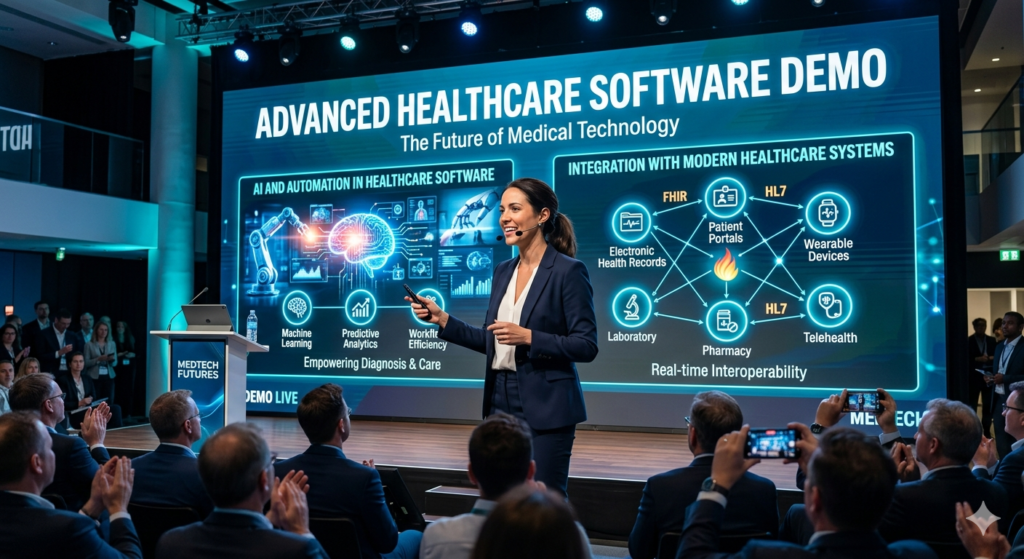
AI and Automation in Healthcare Software
If there’s one thing that truly defines an advanced healthcare software demo, it’s the integration of AI and automation. These technologies are no longer futuristic concepts—they’re actively transforming how healthcare facilities operate today.
During the demo, you’ll likely see AI-powered features such as predictive analytics. These tools can analyze patient data to identify trends, helping doctors make more informed decisions. For example, AI can flag potential health risks based on a patient’s history, allowing for early intervention.
Automation also plays a huge role. Tasks like appointment reminders, billing, and report generation are handled automatically, reducing the workload on staff. This not only saves time but also minimizes errors, which is crucial in a field where accuracy is everything.
One fascinating aspect is how AI enhances patient engagement. Chatbots and virtual assistants can handle basic inquiries, schedule appointments, and even provide health tips. This creates a more interactive and responsive experience for patients.
According to recent industry insights, healthcare organizations that adopt AI-driven systems can improve operational efficiency by up to 30%. That’s a significant boost, especially in high-pressure environments like hospitals and clinics.
Integration with Modern Healthcare Systems
Another key highlight of an healthcare IT software demo is integration. Modern healthcare systems rely on multiple tools and platforms, and the ability to connect them seamlessly is a major advantage.
During the demo, you’ll see how the software integrates with electronic health records (EHR), laboratory systems, and even wearable devices. This creates a unified ecosystem where data flows freely, eliminating silos and improving collaboration.
For example, when a lab test is completed, the results can be automatically updated in the patient’s record and shared with the doctor. This reduces delays and ensures that everyone has access to the latest information.
Integration also extends to external systems, such as insurance providers and government databases. This simplifies processes like claims management and compliance reporting.
In a world where data is king, integration is the glue that holds everything together. Without it, even the most advanced software can fall short. That’s why this aspect is often a major focus during demos.
Free Hospital ERP Demo: Comparing Solutions Effectively
Choosing the right software can feel like navigating a maze, especially with so many options available. A free hospital ERP demo simplifies this process by allowing you to compare solutions side by side. Instead of relying on marketing claims, you get to see how each system performs in real-world scenarios.
One effective way to compare solutions is by focusing on key criteria such as usability, features, scalability, and support. During the demo, pay attention to how intuitive the interface is. Can your staff learn it quickly, or does it require extensive training? Ease of use can make a huge difference in adoption.
Features are another important factor. While most systems offer similar core functionalities, the details can vary significantly. Look for features that align with your specific needs, whether it’s advanced reporting, inventory management, or patient engagement tools.
Scalability is equally important. Your organization may grow over time, and the software should be able to handle that growth. A good ERP system will adapt to increasing demands without compromising performance.
Support and maintenance should not be overlooked. Even the best systems can encounter issues, and having reliable support can make all the difference. During the demo, ask about response times, training resources, and ongoing updates.
By comparing these aspects during a demo, you can make a more informed decision and choose a solution that truly meets your needs.
Medical Practice Management Demo: Optimizing Daily Operations
A medical practice management demo focuses on one core goal—making your daily operations smoother and more efficient. From scheduling appointments to managing billing and patient records, this type of software acts as the backbone of your practice.
During the demo, you’ll see how different tasks are interconnected. For example, when a patient books an appointment, the system automatically updates the schedule, notifies the doctor, and prepares the billing process. This level of integration reduces manual work and ensures consistency.
Another key feature is reporting. The software can generate detailed reports on various aspects of your practice, such as revenue, patient flow, and staff performance. These insights help you make better decisions and identify areas for improvement.
Time management is another area where this software shines. By automating routine tasks, it frees up time for staff to focus on patient care. This not only improves efficiency but also enhances the overall patient experience.
In essence, a practice management demo shows you how technology can turn a hectic workday into a well-organized routine.
Healthcare IT Software Demo: Enhancing System Efficiency
A healthcare IT software demo goes beyond basic features and dives into the technical backbone of the system. It highlights how the software improves overall efficiency by optimizing processes and reducing redundancies.
One of the main areas of focus is data management. The system ensures that information is stored securely and can be accessed quickly when needed. This is especially important in healthcare, where timely access to data can impact patient outcomes.
Another important aspect is system performance. During the demo, you’ll see how the software handles large volumes of data without slowing down. This is crucial for hospitals and clinics that deal with high patient loads.
Security is also a major focus. Features like encryption, access controls, and regular updates ensure that sensitive data is protected at all times.
By the end of the demo, you’ll have a clear understanding of how the software enhances efficiency and supports your operations.
Key Features to Look for in a Healthcare Software Demo
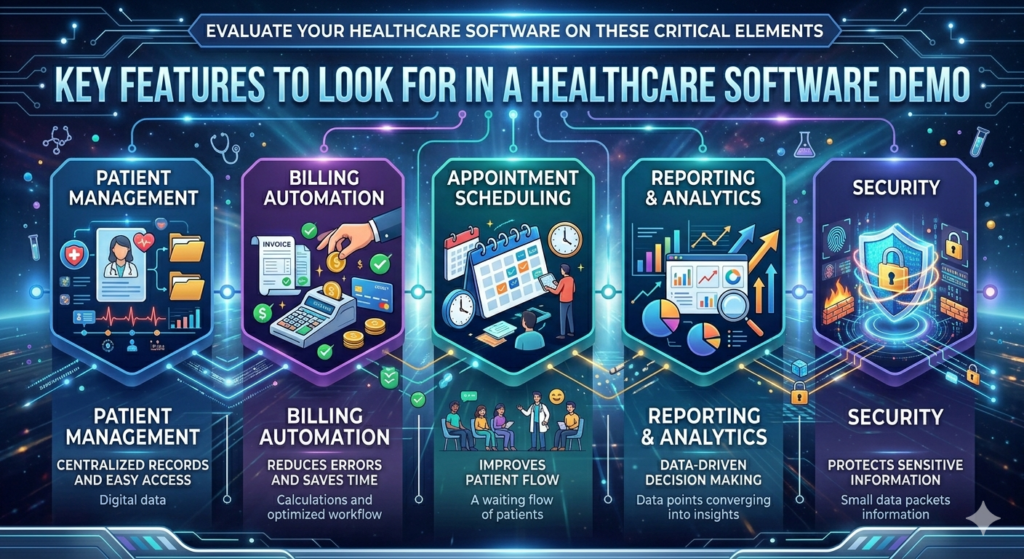
When evaluating a demo, it’s important to know what to look for. While every system is different, certain features are essential for any healthcare software.
Here’s a quick overview:
| Feature | Importance |
| Patient Management | Centralized records and easy access |
| Billing Automation | Reduces errors and saves time |
| Appointment Scheduling | Improves patient flow |
| Reporting & Analytics | Data-driven decision making |
| Security | Protects sensitive information |
These features form the foundation of a reliable system. During the demo, pay close attention to how well they are implemented.
How H.R. Software Solutions Stands Out
H.R. Software Solutions has built a reputation for delivering advanced healthcare software demos that are both informative and engaging. Their approach focuses on understanding your needs and providing tailored solutions that align with your goals.
One of their key strengths is customization. They don’t believe in one-size-fits-all solutions. Instead, they work closely with clients to ensure the software meets specific requirements.
Another standout feature is their support system. From initial demo to implementation and beyond, they provide continuous assistance, ensuring a smooth transition.
Their software also incorporates the latest technologies, including AI and automation, making it a future-ready solution for healthcare providers.
Conclusion
Scheduling a healthcare management software free demo is more than just a step—it’s a strategic move toward improving efficiency, patient care, and overall operations. Whether you’re running a small clinic or a large hospital, the right software can make a significant difference.
By exploring demos, trials, and ERP solutions, you gain valuable insights that help you make informed decisions. And with providers like H.R. Software Solutions, you’re not just choosing software—you’re choosing a partner in your growth.
FAQs
- How can I schedule a healthcare software demo online?
You can visit the provider’s website, fill out a demo request form, and choose a suitable time slot. Many platforms offer instant booking सुविधा. - Is a hospital software free demo really free?
Yes, most providers offer free demos with no obligation, allowing you to explore features before making a decision. - What is included in a clinic management software free trial?
A free trial usually includes access to core features like scheduling, billing, and patient management for a limited time. - How long does a medical software demo booking session take?
Typically, demos last between 30 minutes to an hour, depending on the complexity of the system. - Why should I request a healthcare ERP demo?
An ERP demo helps you understand how integrated systems can streamline operations and improve efficiency across departments.
Leave a Reply